Introduction
For many developers, the $20 per month for Cursor and Copilot is a standard for unlimited utility. However, Anthropic’s Claude Code stands out as an exception. It performs exceptionally well with large codebases, but its price is several times higher. If you only code on weekends, a few dollars for an API key might suffice; however, for daily development, monthly bills can easily exceed $50, $100, or even $200. Some users candidly state, “Claude Code is more powerful than Cursor. The only reason I’m still using Cursor is that Claude Code is just too expensive.”
Price seems to be the main factor hindering the explosive growth of this product. After all, compared to other tools, Claude Code is “really impressive.” Although Cursor’s underlying large model also comes from Anthropic, Steve Yegge commented, “Claude Code makes Cursor, Windsurf, Augment, and similar tools look outdated.”
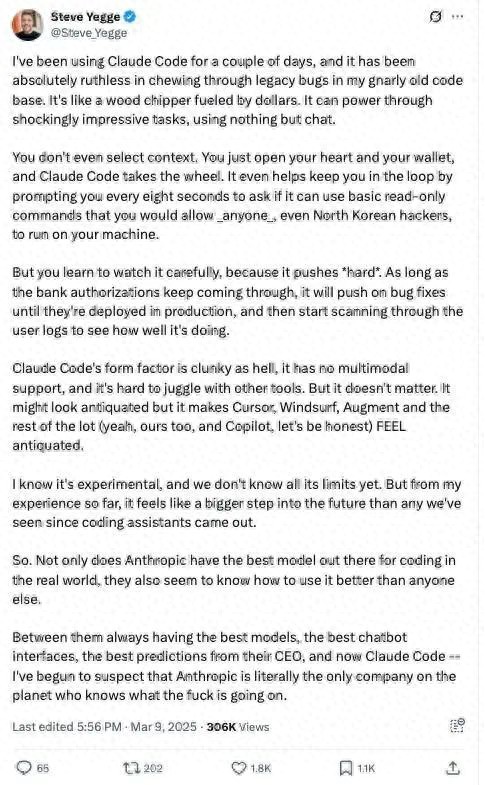

I used Claude Code for a few days, and it was ruthless in cleaning up the legacy bugs in my messy old code, like a money-burning wood chipper. Through dialogue alone, it can accomplish some astonishingly difficult tasks. You don’t even need to manually select context. You just need to open your heart and wallet, and Claude Code will take over everything. It even reminds you every eight seconds, asking if it can run some read-only commands—those commands you wouldn’t mind even if North Korean hackers ran them on your machine.
However, you will learn to keep an eye on it because it really is powerful. As long as the bank’s deduction authorization is still in place, it will keep pushing forward until the bugs are fixed and deployed, then it starts scanning user logs to see how it performed.
The user experience with Claude Code is somewhat clunky; it lacks multimodal support and doesn’t integrate smoothly with other tools. But this doesn’t matter. It may look a bit old-fashioned, but using it makes Cursor, Windsurf, Augment, and even our own products, including Copilot, feel like relics of a bygone era.
I know this is still an experimental product, and we don’t know its limits. But from my current experience, it feels like a significant leap toward the future, more than anything since the advent of coding assistants.
Thus, Anthropic not only possesses the most suitable large model for real development scenarios, but they also seem to understand better how to utilize it. With their consistently strong models, user-friendly chat interface, the CEO’s accurate judgment, and now Claude Code—I’m starting to suspect that Anthropic might truly be the only company on this planet that knows what it’s doing.
Recently, Claude Code founder Boris Cherny shared his insights on the product’s positioning and design philosophy in a rare interview. He discussed the original intent behind developing this coding assistant, the target user group, considerations behind the pricing strategy, and shared some usage tips.
He also talked about Anthropic’s vision for the future of Claude Code as one of the most powerful models in the programming field: helping developers transition from “code writers” to “judgers of code correctness.” In other words, future developers will no longer just be keyboard operators but the main decision-makers in technology.
Interview Highlights
Alex Albert: Boris, let’s start with the basics: What is Claude Code? How did it come about?
Boris Cherny: Claude Code is a method of agentic coding implemented in the terminal. You don’t need to learn new tools, switch IDEs, or open specific websites or platforms. It’s a way to use agentic programming directly in your existing work environment.
This idea actually stems from the daily work habits of Anthropic’s engineers and researchers—because everyone uses a diverse tech stack. It’s very varied, and there’s no unified standard. Some use Zed IDE, some use VS Code, and others insist, “No one is taking Vim from me unless I’m dead.” So we wanted to create a tool that is friendly to everyone, ultimately choosing the terminal as the entry point.
Alex Albert: I see, the terminal is almost the most universal interface; it’s flexible and has long been integrated into everyone’s workflow.
Boris Cherny: Exactly. And the terminal itself is very simple; its simplicity allows for particularly rapid iteration. Looking back, this turned out to be an unexpected advantage, even though it wasn’t our original intention.
Alex Albert: So if I’m a new developer just starting with Claude Code, how can I get this product running?
Boris Cherny: You just need to download it from NPM: npm install -g @anthropic-ai/claude-code. Once installed, as long as you have Node.js on your system, you can run it directly. After starting, it will guide you step by step through the remaining configuration process. Once installed, you can start talking to it, and it will begin writing code.
It works in any terminal, whether it’s iTerm2, the Mac’s built-in terminal, or SSH/TMUX sessions. Many people actually use Claude Code in the terminal within their IDE, such as the built-in terminal in VS Code. In this case, you can see files being modified and presented in a more aesthetically pleasing and clearer way in the IDE. We also leverage more information provided by the IDE to make Claude smarter. However, regardless of which terminal you use, the experience remains consistent; you just need to run Claude in the terminal.
Alex Albert: Claude Code was released in February this year, and it’s been about three months now. How has the community feedback been?
Boris Cherny: It’s been insane, completely beyond our expectations. Before the release, we hesitated about whether to make it public. This tool was used extensively internally, greatly enhancing the efficiency of engineers and researchers. We even discussed, “This is our secret weapon; do we really want to share it with the outside world?” After all, this is the tool that Anthropic uses every day.
But it turned out to be a very correct decision to release it. It does enhance productivity, and people genuinely love it. Initially, only a few core team members used it, but later we opened it up for all Anthropic employees. We saw a DAU (daily active users) graph that shot up vertically in just three days. We thought, “This is crazy; it must be a hit.”
Afterward, we selected some external users for a pilot to confirm whether we were being overly optimistic, and the feedback received was also very positive. At that point, it became clear—it truly has value.
So it first caused a stir internally at Anthropic, with all engineers and researchers using it, which led us to decide to release it.
Moreover, the entire development process was particularly interesting: Claude Code itself was written using Claude Code. Almost all the code went through multiple rounds of writing and refactoring with Claude Code.
We have great confidence in internal testing because it’s really important. You can clearly feel which products are used daily by the development team; the details of those products are meticulously polished. We hope Claude Code becomes such a product—you can feel the developers’ dedication as soon as you use it.
Alex Albert: Who do you think is the ideal user of Claude Code right now? Who is using it? What kind of developers?
Boris Cherny: I think the most important thing is—Claude Code is quite expensive.
If you’re just coding for fun on weekends, you can give it a try, for instance, by getting an API key and charging five dollars. But if you want to use it for more serious work, you’ll likely spend around fifty, one hundred, or even two hundred dollars per month, depending on usage. Generally speaking, you’d spend about fifty dollars a month.
Many companies are actually using Claude Code now. It’s particularly suitable for large companies. Especially when dealing with large codebases, it performs exceptionally well. There’s no need for additional indexing or complex configurations; it’s basically plug-and-play, suitable for large codebases in almost any language.
As for the integration of Claude Code with Claude Max, it’s because we previously found that users paying with API keys often worried about usage limits, which negatively affected their willingness to use it. To improve this issue, we included Claude Code in the Claude Max subscription plan. You only need to subscribe to Claude Max to use Claude Code unlimitedly, with monthly fees ranging from $100 to $200. Users can choose different prices and usage limits based on their needs, but in reality, very few people reach the limits; it can essentially be seen as “unlimited” Claude Code.
Alex Albert: So as a developer, if I have my own codebase on my machine, I open the terminal, type claude, and hit enter, what happens next?
Boris Cherny: Claude will call various tools and execute tasks step by step. If you’ve previously used those programming assistants in IDEs, what they do is complete one line or a few lines of code. This is completely different.
Claude Code is very “agentic”—it understands your requests and uses all available tools, such as Dash, file editing, etc., to explore the codebase, read files, gather context, and then edit files or make the changes you want.
Alex Albert: It sounds like a complete transformation of the programming paradigm we’ve had for the past 20 to 30 years.
Boris Cherny: For me, this change has a deep historical background. I’ve been coding for many years, but actually, my grandfather was one of the earliest programmers in the Soviet Union in the 1940s.
Back then, there was no software programming; he wrote programs using punch cards. In the U.S., IBM provided a system similar to an IDE, and he programmed daily using that system, bringing the paper cards home. My mother would use those cards as drawing paper when she was young, coloring on them with crayons; that was part of her childhood.
Since then, programming has continuously evolved: first punch cards, then assembly language, followed by COBOL and FORTRAN, the first generation of high-level languages. The 1980s saw the rise of static typed languages like Java and Haskell, and in the 1990s, we had interpreted languages like JavaScript and Python, which also had certain security features.
The evolution of programming languages has always gone hand in hand with the evolution of programming experiences. For example, with the advent of Java, we also saw the emergence of IDEs like Eclipse, which introduced code completion features for the first time. You type a character, and it pops up a suggestion list asking, “Is this what you want to write?” This was a revolutionary experience for developers because you no longer had to remember all the details.
So in my view, today, Claude Code represents the beginning of another evolution. The languages themselves have stabilized relatively, and modern languages can generally be categorized into several major families that are similar to each other.
But the core change now is the transformation of the programming experience: you no longer need to deal with punch cards, write assembly, or even necessarily write code; instead, you interact with the model through prompts, and the model computes the coding part. This is something I find very exciting.
Alex Albert: We’re basically transitioning from the punch card era to the prompt era. We’ll discuss this further later, but first, I want to talk about the model aspect. Not long ago, Claude Code was primarily powered by the Claude 3.7 Sonnet model. What new changes have occurred now that the Claude 4 series models are driving Claude Code? Where do you think it will head next?
Boris Cherny: It was probably a few months before the model release that we started experimenting with these new models internally. I remember being genuinely shocked by its capabilities the first time I used it, and I thought it could unlock many new use cases. Especially when using Claude Code synchronously in the terminal, a significant change is that Claude has become better at understanding and maintaining instructions. Whether you give it commands through prompts or via Claude.md, it can execute and adhere to your requests well.
This change is substantial because while Claude 3.7 was a strong programming model, it was difficult to handle.
For example, if you asked it to write tests, it might directly mock all the test code, and you’d have to say, “No, that’s not what I meant.” Usually, you’d have to say it once or twice before it understood, but because it was so powerful, you were willing to tolerate these small issues. Now, the Claude 4 series models can generally understand your intentions accurately and complete tasks as requested on the first try.
Opus has taken it a step further compared to Sonnet; it not only understands my intentions well but can accomplish many things that previous models couldn’t in one go. For instance, I haven’t personally written unit tests in months because Opus directly helps me write them, and almost every time it gets it right on the first try. This is incredibly useful in a terminal environment because you can use it more “hands-off”.
But I think the coolest way to use it is in GitHub Actions or other environments. You just give it a task, and it can execute it automatically. When it returns with the correct result, that experience of “getting it right the first time” is truly fantastic.
Alex Albert: So now in GitHub Actions, we can directly @Claude in GitHub to have it handle tasks in the background and return with results and new PRs?
Boris Cherny: Yes, exactly. You open Claude in the terminal as usual, run the claude command, and then execute /install GitHub Action; it will guide you step by step to install this feature. It only takes a few steps, mostly automatic, and you just need to click a couple of buttons for Claude’s GitHub application to be installed in your repo.
The overall experience is really cool. In any issue, you can directly @Claude. I use it in PRs every day. For example, if a colleague submits a pull request, I no longer say, “Hey, can you fix this issue?” I just say, “@Claude, fix this issue,” and it will automatically correct it. Similarly, I won’t say, “Can you write a test?” Now I just say, “@Claude, write a test,” and it will complete it automatically. These things are no longer a problem.
Alex Albert: This is essentially a whole new way of programming—you can call on an ever-available programmer to help you solve problems, and it’s not running on your local machine but completing all operations in the background.
Boris Cherny: Yes, I think this is beginning to interact with the model in a “collaborative programmer” manner. Previously, you mentioned a colleague; now you can directly mention Claude.
Alex Albert: What changes will occur in software engineering in this model? As we start managing these Claude Code instances running in the background, what transformations will happen?
Boris Cherny: I think this does require some shifts in thinking.
Some people really enjoy the feeling of controlling code; if you’re used to writing code by hand, you’ll need to adapt to the industry’s shift—you’re no longer the one writing code personally, but coordinating AI agents to help you write code. Your focus will shift from “writing code by hand” to “reviewing code.”
I believe this change is very exciting for programmers because you can accomplish more in a shorter time. Of course, there will still be situations where I must dive deep and write code by hand, but to be honest, I’ve started to dread it—because Claude excels in this area.
I believe that as model capabilities continue to improve, those scenarios where you must write code by hand, such as particularly complex data structures or high-complexity interactions between multiple system components, or requirements that are hard to describe, will become increasingly rare. In the future, more and more programming work will be about “how to coordinate these AI agents to complete development tasks.”
Alex Albert: I want to delve deeper into your workflow, specifically how you use this tool combination: from IDE integration, using Claude in the terminal, to its background operations in GitHub. How are you currently combining them?
Boris Cherny: My work can now be divided into two categories. One category is simple tasks, like writing tests or fixing a small bug; for these tasks, I usually let Claude complete them directly in GitHub Issues. The other scenario is that I often run multiple Claude instances in parallel. I have several local copies of codebases, so in one terminal tab, I’ll let Claude do one thing, press Shift+Enter to enter auto-accept mode, and then check back in a few minutes; Claude usually completes it and sends me a terminal notification.
The other type of work is more complex, requiring deeper involvement from me, which I believe remains the mainstream of engineering. Most engineering tasks are not “one hit”; they are still quite challenging. In such cases, I will run Claude in the IDE terminal, let it do part of the work, and then it might get stuck or the code might not be perfect. Then I will manually tweak it in the IDE to polish off the last part.
Alex Albert: It seems that the interaction with Claude is based on task difficulty; the simpler it is, the more automated it becomes, and the more complex it is, the more you need to participate personally.
Boris Cherny: Yes, when you first start using these tools, there’s a learning process. Some people try to get Claude to handle too complex things right away, resulting in it getting stuck and not producing satisfactory output, which makes you unhappy. This is a learning phase everyone must go through, gradually forming an “internal calibration” to know what Claude can do, which tasks it can handle in one go, and which require you to guide it a couple of times to complete.
Moreover, with each new model, this calibration needs to be redone. Because capabilities are constantly improving, each time a model updates, Claude can accomplish more tasks correctly in one go. This means you can gradually assign more complex tasks to it.
Alex Albert: I’ve also noticed that even in non-coding fields, these models are evolving rapidly. If you couldn’t accomplish a task with a certain model six months ago, it’s incorrect to judge by that standard now. You have to reset your intuition every time.
Boris Cherny: Yes, that’s absolutely correct.
Alex Albert: I’m curious if there are any practical tips or tricks? For example, are there any interesting uses you’ve seen within the developer community or internally?
Boris Cherny: I think one of the most valuable tips I’ve seen is that whether internally at Anthropic or among external heavy users, many people now first let Claude do “planning” before starting to write code. A common mistake for new users is to directly ask Claude to implement a complex feature, resulting in output that diverges significantly from their expectations.
A more effective approach is to first have it come up with a plan. I’ll clearly tell Claude, “This is the problem I want to solve; before writing code, please list a few ideas, don’t rush to start. Then it will list several options, like option one, two, three. I can pick one and three and say, “We can combine these; now you can start writing.” Claude generally cooperates well in this regard.
If Claude already has some contextual information, you can let it enter “extended thinking” mode, and it performs particularly well at that time. But if it has no context at all, and you ask it to brainstorm from the start, it actually won’t come up with anything—just like a person, if you don’t read the code or look at the context and just sit there thinking, it’s useless. My usual approach is to let Claude read some relevant files first, then pause and let it start brainstorming and listing ideas before letting it start writing code.
Alex Albert: So you’re adopting an “alternating” workflow: call the tool → think → call the tool again → think again, this back-and-forth approach.
Boris Cherny: Yes, exactly. We also design our internal model evaluations this way: first provide context, then let the model think, and finally let it use tools to edit or execute Bash commands; the results generally improve.
Alex Albert: Let’s talk about the Claude.md file; it looks powerful.
Boris Cherny: Yes, we use Claude.md for many things. It serves as Claude’s “memory,” allowing it to continuously remember your instructions. These instructions can be shared within your team or across all your projects.
The simplest approach is to create a Claude.md file in the root directory of your codebase, a regular markdown file (CLAUDE in all caps, md in lowercase), which Claude will automatically read upon startup. You can write some general instructions, such as common Bash commands, important architectural decision change files, MCP servers, etc., all included.
This is a team-level Claude.md, which you share with other team members so that everyone doesn’t have to write their own.
The second type is your personal version, called Claude.local.md, placed in the same location but not committed to the codebase (can be ignored by .gitignore), effective only for you.
The third type is a global Claude.md, located in the .Claude folder in your home directory; most people don’t use this much, but if you want to share instructions with Claude, it’s an option.
Lastly, there’s a nested Claude.md type that can be placed in any subdirectory of the codebase, and Claude will automatically load it when it deems relevant.
Alex Albert: So these Claude.md files can define many contents, such as your coding style, how Claude interacts with you, and what preferences it should know about, right?
Boris Cherny: Yes, absolutely. Sometimes when I’m conversing with Claude, if it performs particularly well or particularly poorly, I press “#” (the hash), which enters “memory mode.” I tell it, “You should remember this.” For instance, “I need to run the linter every time I write code,” I’ll explicitly tell it, and it will automatically write this into the appropriate Claude.md file.
Alex Albert: What are the future plans for Claude Code?
Boris Cherny: We are currently considering two directions. One is to enable Claude to better collaborate with various tools. It already works with all terminals and supports many IDEs, and can integrate with multiple CI systems.
We are exploring how to further expand Claude’s capabilities to natively use all the tools you commonly use, understand how to use these tools, and integrate seamlessly.
The other direction is to make Claude more adept at handling tasks that you might not want to specifically open a terminal for. For example, can I mention Claude in a chat tool to automatically fix an issue? Just like how you operate now on GitHub.
We are trying various approaches, hoping to find genuinely “usable” solutions before opening them up for users.
Comments
Discussion is powered by Giscus (GitHub Discussions). Add
repo,repoID,category, andcategoryIDunder[params.comments.giscus]inhugo.tomlusing the values from the Giscus setup tool.